I have worked on 100s of WordPress-based websites in the last 12 years and from my experience, I can say, there is one WordPress plugin, that’s easy to set up and works wonderfully to fight against comment spam. It’s called Antispam Bee.
You can add an extra layer of security to your WordPress website using the Cloudflare service. Here is a list of rules that you can apply to your website in Cloudflare settings to improve security.
Secure WordPress login page and administrator section
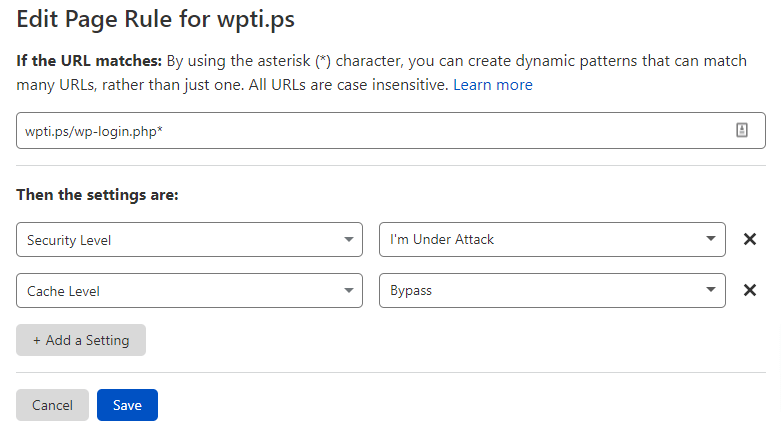
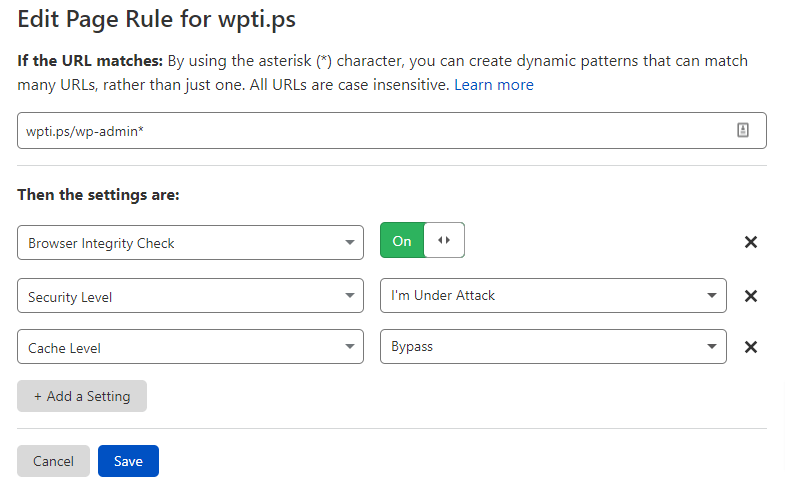
Secure WordPress admin and login URL from bot attacks by making sure that you add rules as per the given screenshot below.
Secure wp-login.php URL Secure WordPress admin section and disable cache
Disable access to the xmlrpc.php file
You can disable access to the xmlrpc.php file and allow only certain IP addresses. You may want to allow Jetpack or any other service.
The AS Number 2636 is jetpack number, you can use it to whitelist jetpack services.
You can copy the expression code below to implement the rule.
(http.request.uri.path eq "/xmlrpc.php" and ip.geoip.asnum ne 2635)
You can also completely block access to the xmlrpc.php file via the expression below.
(http.request.uri.path contains "xmlrpc.php")
Block xmlrpc.php file completely using Cloudflare firewall rule.
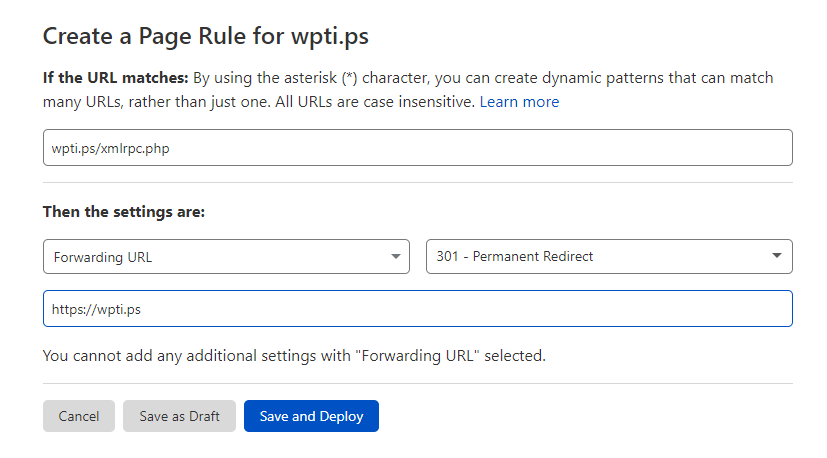
You can also redirect any traffic to xmlrpc.php file to home page or any other URL using page rule.
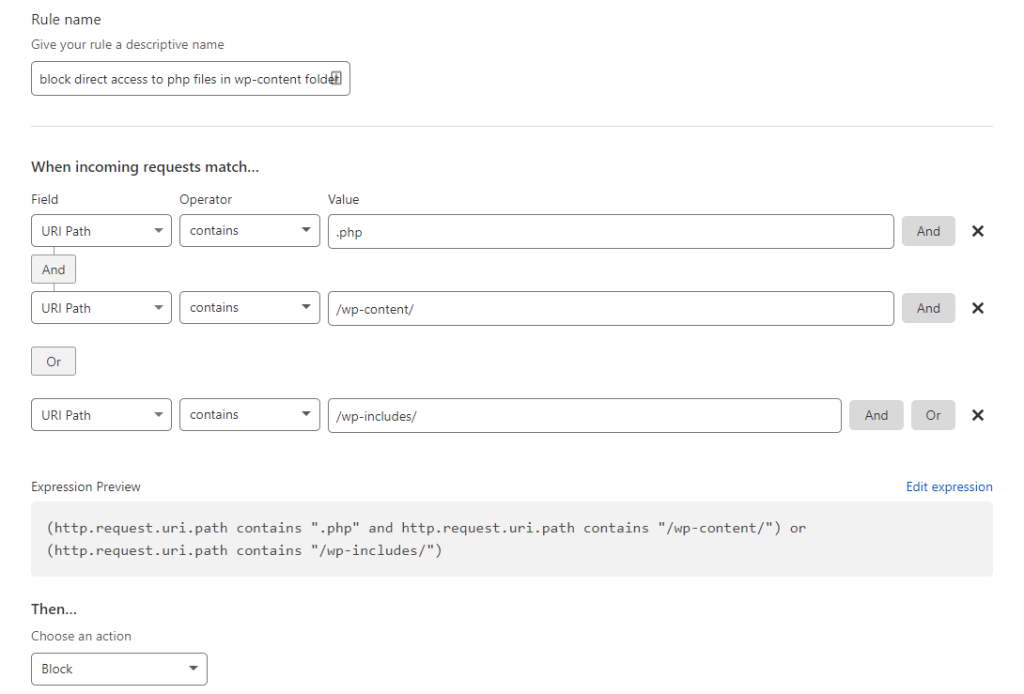
Block direct access to PHP files in the wp-content and wp-include folder
Direct access of PHP file can be blocked in wp-content or wp-includes folder.
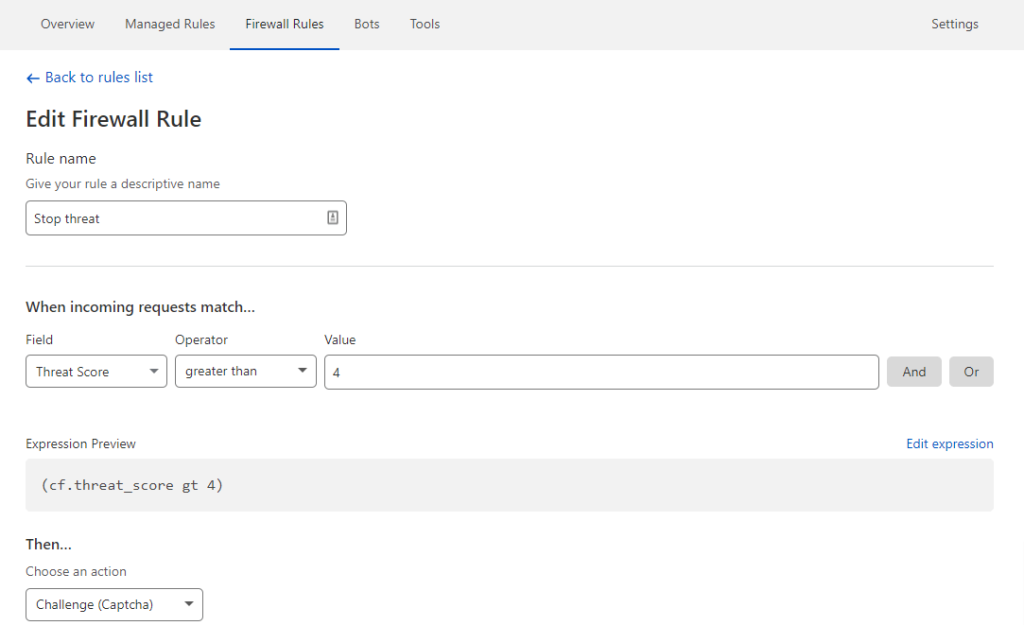
Add Captcha or Challenge users who have a higher threat score
Cloudflare has a Threat Score system, that gives a score to IP addresses based on their reputation. You can use it to block or challenge visitors with captcha. Use this option carefully not to block or discourage your real human visitors.
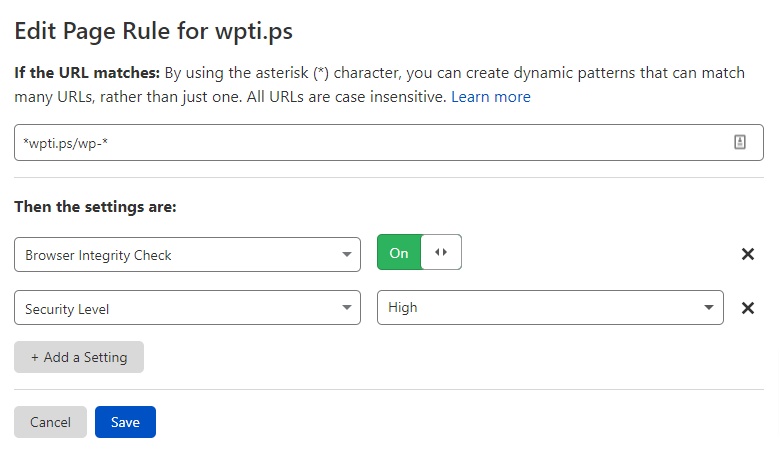
Secure requests with “wp-“
You can also secure any URL that has wp- , remember to put this rule below the wp-admin or wp-login.php RULE.
Do you use any of the rules, or you have any questions? Let me know in the comment section 🙂
File Manager plugin in WordPress is one of the most famous plugins with over 600,000 active installations. It allows users to browse, edit, and upload files and folders in your server that’s running WordPress.
CAUTION: We strongly recommend that you never use any type of file manager plugin or WordPress’s inbuilt file editor.
Vulnerability in File Manager Plugin
List of All Previous Vulnerabilities in File Manager Plugin
File Manager Plugin has been vulnerable almost every year and it had critical vulnerabilities most of the time. Recently a new zero-day exploit has been found in the site which is spreading havoc among website owners. Currently, there are over 300000 sites that are vulnerable to this exploit.
Alternative to File Manager Plugin in WordPress
There are many alternative plugins for file manager plugin, But I would strongly recommend none. In my view, you should not use any plugins for making changes to your WordPress files, not even the WordPress file editor. You should use SFTP instead to connect to your server and make changes to the site.
Disable Plugin & Theme editor in WordPress :
define( 'DISALLOW_FILE_EDIT', true );
You can use the above code in your wp-config.php file, to disable plugin and theme file editor in WordPress to avoid any unintended consequences. If you still want to use the plugin, make sure that you always use the latest version of the plugin and delete the plugin as soon as you finish using it.
If you have any doubts about your WordPress site being hacked or it’s extremely slow or you see any weird characters in google search results, when you search your website URL, then it could be an indication of your site being hacked. If you have any questions related to your WordPress site, feel free to contact me via the contact form or you can also contact WordPress experts from wp24x7.com to help you clean up your website with their Website Malware Removal Service.